Friday, July 4, 2014

Big Time Blogging Challenge: Favorites

Today's Big Time Blogging Challenge prompt by Big Time Literacy is about favorite subjects and lessons to teach, here goes:

When people asked me about my favorites as a child, I could carry on forever talking about the reason I had multiple favorites of something.  Eyes would glaze over, or a look of regret for asking would creep across the face.  Never did it hinder me from espousing my list of favorites!

As an adult, I can't say that I've changed too much.  I have had very few moments in my classrooms that I haven't enjoyed.  I've taught a lot of lessons, and guided in a lot of inquiry that made my heart sing.  However, looking back over my eight years in education, I've picked one lesson that I've really enjoyed every time I've taught it.  I hope they are something you can be inspired by!

Martin's Big Words

I've always loved the I Have a Dream speech by MLK, Jr.  His passion is palpable as you listen to this words.  I've used the speech when talking about delivering speeches with my students.  I've used it when thinking about how they picture an improved society.  I've used it for one of my favorite lessons, big words.


When I teach the big words lesson, I always read Martin's Big Words by Doreen Rappaport (check out her other gorgeous books).  It tells the story of MLK in an accessible way, that is also engaging in upper grades.  This book introduces the concept of big words.  The students and I always have a discussion about what the author means by big words.  Does she mean length of a word?  No.  What does she mean?  She means the strength of the word, the size of the idea.  My kids have had some amazing ways to describe big words.

After this discussion, we listen to his speech.  Throughout the speech, students are listening for and writing down the big words/ideas that MLK uses as he addresses his audience.  This has been cause for some really engaged listening.  Once we've listened through, we discuss what he was saying.  What he wanted for the future.  Another amazing discussion!

We then use the words to make a word cloud.  I have the students look at their list, reflect on the speech, and choose the five biggest ideas they think he was conveying in his speech.  The students read their words aloud while I (or another student) plug the words into a world cloud generator.  I've used Wordle and Tagxedo in the past to make my clouds.  Once we've added our words and generate the cloud, we have a cloud where the big words that stuck out to the students the most are the largest.  They usually gasp with excitement when it finally shows up.  Here is an example of what we created two years ago:


Their excitement and their contemplation in this lesson are thrilling.  I usually display the word cloud on a bulletin board after I have students illustrate portions of the speech that they feel are a great visual.  


Overall it's a very powerful lesson, and I absolutely love it!


Thursday, July 3, 2014

Big Time Blogging Challenge: My Family

I'm back for my second day of the Big Time Blogging Challenge from Big Time Literacy.  Today's prompt asks me to share a post about my family, so here goes:

The family I come home to every night is my sweet husband, Jonathan.  We have been married for a year on the 13th, and have been together for more than six years.  He is my biggest supporter.  He's helped me move my classroom six times (not including all of the times he's had to move it to storage units in between classrooms).  He spends hours in my classroom helping me get it ready each year.  He's even been my room mother when I haven't had any volunteers.  He's more than I could have ever hoped for.  I'm so incredibly lucky.


Skating at a 5th grade party
Leaving our Wedding
Peterhof Palace, St. Petersburg, Russia on our honeymoon


Wednesday, July 2, 2014

Big Time Blogging Challenge: Educational Experience

I'm back!  Well, I hope to be back.  I'm taking on the Big Time Blogging Challenge from Big Time Literacy.  I'm hoping that it will help me get into the groove of blogging.  I still read A LOT of blogs, but I never feel like I have much to contribute.  Hopefully some of her prompts will help me to feel like I'm writing some worthwhile posts.

Anyway, today is July 2, so the prompt is: "How long and in what capacities have you been in education?"  I've addressed this before, but for those who have never been to my blog here goes:

2014-2015 will mark my 9th year as a teacher.  I began my career in a rural school district teaching 1st-8th grade classes for gifted students.  I loved my small school, and the family I had created with my students, but after three years I felt like it was time to move to something bigger.

Over the last five years, I've been in a large (for Southwest Missouri) school district.  I've been through a lot in this district.  I was first hired to be a 3rd & 4th grade gifted teacher, but got RIFed when the program had some grade levels eliminated (darned budget cuts).

Next, I taught 5th grade for a year in an extreme poverty school.  I think this is where I learned the most, it really opened my eyes to the poverty in my town, and the needs of students in poverty. Unfortunately, that school was destroyed by an EF-5 tornado, scattering the already very transient student population to the wind.

Due to this disaster, there were not enough students to have two 5th grade teachers at the temporary location, so I was moved to a bigger elementary in the district.  I taught there for two years.  I had great teaching partners, great colleagues, and great students.

However, I decided to leave to pursue one of my passions: technology.  The district created an instructional coaching position with a focus in technology integration with 8th grade teachers and students as they implemented 1:1 iPads.  That is where I spent the last year.  Working with adults challenged me in ways that I have never been challenged before.  I loved it, but missed having my own group of students SO much.

2014-2015 will see me back in the classroom.  I will be teaching 8th grade reading and writing in a 1:1 iPad classroom.  I will be across the hall from one of my dear friends, and be on the same team as a great group of people I coached last year.  I'm looking forward to it so very much.

Well, that's my educational experience.  I hope that my background and experience can add to the blogging community.  We shall see!

Tuesday, June 4, 2013

Tried it Tuesday (Prezi)

I'm really in to the link ups lately!  It's a great way to find some really awesome stuff.  Thank you to all of you that take the time to come up with the ideas and host them!  Today's link up is going to be with Fourth Grade Flipper's Tried it Tuesday.

Read more about Tried it Tuesday by clicking the button above.

**Disclaimer** I must admit that this isn't the first time I've tried Prezi, but it was the first time I actually completed a project and used it in a presentation.

Anyway, on to the story.  Since the first time I saw someone give a presentation using Prezi a few years ago, I've been fascinated with it.  The moving around and zooming in and out.  I signed up right away for an account and started playing around.  However, I quickly realized I am more of a linear thinker, and Prezi just gives you this wide open space and says "have at it!"  Eek!  I was very quick to put Prezi on a list of cool stuff to try later.

Fast forward to last year, my students were really stuck in a rut when it came to presentations.  They continually wanted to create simple PowerPoints or even posters.  While I am still okay with PowerPoints and posters, it kind of gets old sitting through what feels like the same thing over and over again as my kiddos presented.  Enter...the tech kids!  I had kids that were so willing and eager to try anything that one day I just said, "Hey guys, I know about this website, but I have no idea how to use it.  Would you like try?"  I logged them into my account and they ran with it.  They were zooming in and out and flying all over the page during their presentation, and I feel like they worked harder to make the content more meaningful.  I didn't have to stand over them and say well here's how you do this and that.  They just played and figured it out on their own.

Anywho... seeing that it just took playing around, I was once again inspired to use it.  However, I never got around to fully making a presentation last summer or during this school year either.  My students always had the option of making a Prezi when we did presentations this year, but few of them chose to try.

As the end of school rolled around, so did a tech conference that I had agreed to present at.  Now, I'm great in front of kids, but TERRIBLE in front of adults.  I get so panicky and my voice trembles.  People claim they can't tell, but I know otherwise.  Well, I had agreed to present about the flipped classroom.  I knew I wanted a presentation that could help distract from my poor speaking skills, so I thought, hey Prezi is visually appealing, lets give it a try.  So I sat down and got to work, and you know what?  I actually created a Prezi!  Since the last time I gave it a go, they have created some really great templates to use as a base for your presentation, and they've simplified the controls (no more wheel).

All kinds of templates for building your Prezi!
Easier controls!


I would say that I am still not expert, but I can definitely continue to recommend this tool to students and teachers.  With my job next year, I will be working with 1:1 iPads for 8th graders, I know I will be suggesting that Prezi get added to all of the iPads.  Students can create and view presentations right on the iPad.  So, if you have any presentations coming up, give Prezi a try!

BTW, here's my presentation!


Heather

Monday, June 3, 2013

Must Have Monday: Utility Tote

I'm linking up with Teaching with a Touch of Twang's Must Have Mondays.  I've thought for awhile about what I really MUST have, and there are just so many things.  I think what I'll feature today is my Thirty-One Large Utility Tote.  I must preface this by saying that I DO NOT sell Thirty-One products, and I don't really enjoy those parties where you friends ask you to come spend money and throw parties so you can expect other people to spend money, but I do love my tote!!


I carry A LOT of stuff back and forth between home and school.  I've gone through several different bag options (I even went with the horrid wheeled cart).  Most of the time, my bag ends up too full and handles breaks or I just can't lift it to get it in and out of my car.  However, when I went to my first 31 party, I decided to give one those puppies a try.  I am SO glad I did.  It can hold so much stuff.  So, if you happen to have those friends that invite you to parties, you might want to hit a Thirty-One party and get a large utility tote.  I noticed through a friend that sells them that they're even on sale this month for $10 (rather than $35) if you buy $35 worth of stuff (which is easy to do... I also have a lunch box and an organizing tote).


Head over to Teaching with a Touch of Twang and see what else people must have this Monday!

Heather


Sunday, June 2, 2013

How to Create a Google Form

To go along with my previous post, I created a screencast about creating a Google Form for your classroom library.  It shows how to create a form, how to create the subsequent spreadsheet, and how to access or edit both.  I hope this helps anyone who is interested in using Google for your classroom library.  Once you create this form, you can easily use forms to create all kinds of tools for your classroom.  Good luck.  Just let me know if you have any questions!


**Note**  My personal Google Drive account has a more updated version of Forms than my Google Apps for Education account through the school.  If your form creating tool seems a little different, it should be fairly similar.  Let me know if I can help! :-)

Saturday, June 1, 2013

Optimum Organization: Book Checkout

I'm joining up with the Optimum Organization linky.  I use tips and suggestions I get from blogs ALL OF THE TIME, so I definitely hope to return the favor.  If you decide to link up, be sure to click the link to see all of the guidelines for this linky!


Over the years I've struggled with perfecting the checkout system for my classroom library. I have about a thousand books available to my students, so management can be a bit hairy. I've attempted the "just trust them" system, the old-school card checkout system, and the write it down on a sheet of paper system. None of these worked for me. A lot of my books would disappear. It was frustrating to lose books, because I LOVE my books.  My kids promised that they tried to keep track of my books, but sometimes they just *disappeared*.  I wanted to continue to offer this service to my kiddos, but I needed to find some kind of solution.

Last summer, I decided to go the high-tech route.  I knew I could do it because of the sheer amount of technology I had available in my classroom.  I just had to decide what I wanted to use-- computer, iPad, iPods.  I read all summer about great websites and apps that could be used to monitor your library, but none of them seemed to be something I thought I would stick to.  Finally, I decided why not just use something I already access everyday-- Google!  I've been in love with Google and all of its products for years (I'm still a little bitter about having to say goodbye to Reader though). I've been using Google Drive's Forms in my classroom for 4 years now. If you don't use forms-- you should! This year I decided that I should use Forms for my classroom checkout system.  I didn't have to decide what platform to use this on, because my form would be available on all devices that could access the web.

So, I used Google Forms to create this:

I then set this as one of the links on our homepage (I use Tizmos as the homepage on my computer because it allows for students to quickly access the websites we use most often).  Every time a student wanted to check out a book, they would go to the nearest device and check out their book.  Once the students enter their information on the form, it is all transferred by Google to a spreadsheet that looks like this:


When the students returned book, the placed them in a big purple bucket.  I then trained my classroom librarian to access the form and check books back in from the bucket before placing them back in their genre bucket in the library.  The job got to be quite big, so my librarian chose an assistant and trained her on how to use the form as well.  Every week or two they would take a few minutes to ask students who had books out if they knew the whereabouts of the book.  It made book check out and return so much easier this year!  I didn't really have to do anything, and I lost VERY few books.  If I were remaining in the classroom, this is definitely what I would continue using.

I hope that you can use something like this in your classroom.  Comment if you have any questions!

Heather


Friday, May 3, 2013

Quick Update

Changes, changes.  This year has been yet another roller coaster!  It's been an enjoyable year spent teaching the fifth grade, but changes are coming.  This time, I am making the change!  I've accepted a position within my district as a 21st Century Learning Coach.  I will be helping with the implementation of 1:1 iPads with our 8th graders.  I have struggled with moving out of the classroom, and I know I will miss my 5th graders, but  I cannot wait to be back in a middle school setting and to work with some of my former students again as well as some great teachers.

I also cannot wait to begin turning this blog towards a technology focus.  This summer I will be presenting at a few technology conferences (OERI a local technology conference here in the Ozarks & ISTE in San Antonio).  I will be presenting on the Flipped Classroom, and can't wait to share my resources with you.  I will also be sending in proposals to METC & FETC.  I hope to start meeting some of the great bloggers I've been following for months/years now.

Wednesday, November 21, 2012

Don't miss out!

Teachers Pay Teachers is having a sale Monday and Tuesday!  Many teachers are putting their stores on sale up to 20% off, then TpT is offering an additional 10% off.  My store will be on sale starting Monday!  Enjoy!


Monday, November 12, 2012

Thankful Writing Using the Triple Gold Sentence

I don't know how it goes in your classroom, but sometimes getting my kids to write can be like pulling teeth.  So many of them have such trouble with idea generation, and actually putting their thoughts together in a coherent way is next to impossible.  Don't get me wrong, some of my kids are prolific writers with a true ability to communicate.  These children, however, are few and far between.  That brings me to another thing I learned from Mr. Biffle at the WBT workshop I attended.  It's called the Triple Gold Sentence.  The triple gold sentence simply asks students, in their introductory paragraph, to name three things they can make a point about in their writing.  Each of the next three subsequent paragraphs is based on one of those points.  They would then wrap it up with a closing paragraph.

It's really not much more than the old 5 paragraph essay, but it helped remind me that not everything students write has to have some original format.  At the beginning of each year, I use The Important Book as a model for their first piece of writing.  For some reason, once that first paper is written, I drop the idea of having a "frame" for the students to use.  When I heard about the triple gold, I realized that I could help my students see that writing can be simple if you have a plan.

This week we are writing with a Thanksgiving theme.  I'm allowing my students to choose between two Thanksgiving themed prompts:


Today I talked with them about the structure their paragraph would follow:


We also prepped for our writing by making a web, here's my example:


I think that this "frame" will allow for my students to quickly produce a quality expository piece of writing.  I can't wait to share a finished piece with you all. 

Monday, November 5, 2012

Whole Brain Teaching & Thankfulness

As I mentioned in my previous post, Saturday I attended an all-day workshop.  I know this doesn't sound like the best way to spend a Saturday, but the workshop was on Whole Brain Teaching, and it was put on by Chris Biffle himself.  That man is full of energy!  I hope I am half as energetic after 40 years of teaching as he is.

Chris Biffle
I'm sure many of you are familiar with WBT, but for those of you who aren't, I just have to share the basics.

The Core 4:

Class, Yes: To gain student attention, the teacher simply says "Class" in any manner they choose (varying tone, or drawl).  The students quickly fold their hands, turn to face the teacher, and respond with "Yes" mimicking the teacher.

I've used this "call back" for several years now.  My students like it, because they never know how I will call for them.  I haven't been very good at asking them to fold their hands and focus on me, but I'm certainly going to work harder at that.  It's not very effective if the only thing you get them to do is quiet down, you really want the students' full attention when you call for them.

Mirror: WBT is big on using gestures, attaching physical movement to concepts to engage the motor cortex. When asking students to mirror, you simply say "Mirror" and students hands snap up, palms out, and they repeat the word "Mirror". Students follow your gestures with their own hands thus engaging that motor cortex. You can use mirror when telling a story, giving directions, describing the steps in a procedure, demonstrating a process, you will have your students locked into what you're saying. If they're not locked in, you will easily know because you won't see the movements.

I've never used this particular strategy in my classroom. Saturday was the first I'd really heard of it. I'm excited to see how it might increase productivity in my classroom.

Scoreboard: The purpose of scoreboard is to motivate your class.  What class wouldn't like to earn a few extra minutes of recess, game time, etc?  You simply have a scoreboard somewhere in the room.  (Drawn on a whiteboard, in a file for your SMARTBoard, or with the new WBT scoreboard app).  The scoreboard is a simple t-chart.  One side is a smiley face, one side is a frown (or you can vary to reflect your preferences).   When the students are doing something right, you put a point on the positive side, when they receive a point, the students clap their hands and say "Oh yeah" then get back to what they were doing.  When the students are doing something incorrectly, you put a point on the negative side, when they receive a negative point, the students lift their shoulders and do a quick "hmmpf", then get back to what they were doing.  The key is to always keep each side of the scoreboard within 3 points.  You don't want to over-reward to the point that positives don't mean anything or over-punish where negatives cause feelings of failure.

I haven't used the scoreboard before either.  I have a clip chart in my room that I use for individual positives and negatives, but I don't have a lot to keep the entire class motivated and working toward a common goal.  I think scoreboard will be a great way to unite my kids in working together and encouraging one another to do the right thing.

Teach, Okay: Have you students partnered or in a group of three if necessary.  Present a small amount of information, complete with gestures. When you finish, look at the class and clap two times, say “Teach!” Your students clap twice and respond “OK!”, then proceed to turn to their partner and teach them what you just shared using the same words and gestures.  We all know that explaining something to someone else is a great way to increase and show understanding.  Teach, Okay is a great place to practice this.

We practiced this throughout the course of the workshop.  I can't believe the amount of knowledge Mr. Biffle crammed into our brains in the first 45 minutes using this strategy.  I know this will revolutionize my classroom instruction.

One of the great things about WBT is that Mr. Biffle isn't in it to make money.  You can go to the WBT website and download the materials FOR FREE!  If anything I've talked about sparked your interest, please go there and check it out.  Also, a lot of TpT sellers have developed FREE items to go along with WBT.  Lastly, there are TONS of videos out there modeling these strategies.  Check them out!


I feel like this workshop is something I will be thankful for.  Which segues to the next portion of my post, the Top 10 Things I'm Thankful For linky party hosted by Stories by Storie.  What a great time to think about all that we are thankful for...


I have a great family.  We haven't always agreed on everything, or understood each other, but we've always loved each other.  We may not have always said it, but we showed it in the ways we cared for one another.  I'm blessed to have a hard-working father who always did what he could for us.  I'm blessed to have a truly empathetic mother who always encouraged us despite her own insecurities.  I love my brothers and their incredibly unique personalities.

My boyfriend is one of the kindest, smartest people I've ever met.  He puts up with me, and loves me unconditionally even when I'm acting unlovable.  I don't know what I'd do without him.

My best friend, Kelly, was my teaching partner 2 years ago.  When the tornado struck our community and destroyed the house she lived in, she and her husband moved in with us until they found a new home.  This transformed us from co-workers to family.  I have unconditional love for her.

I have a great group of friends.  I have friends whom I've known since my elementary school and jr. high days.  They are a quirky and amazing bunch of intelligent and beautiful people.  I don't know what I would do without them.

I have been blessed with hundreds of wonderful students over the last decade.  I cannot picture my life without students.  Every time I run into a former student I'm overwhelmed with the awesome remembrance of a special year.

I have three great teaching partners this year.  I'm so glad that I have them to work with, I don't know how I could do it without them.  I also have a great school, we all work hard to do what's best for our kids.  I work for an AMAZING district that's really pulled itself up by its bootstraps after losing multiple buildings in a tornado.  The same can be said for my community.  I don't know how we did it, but after surviving and EF5, we are rebounding and rebuilding.  Amazed by the strength and resiliency of my Joplin.

Lastly, I'm thankful for freedom.  As I watch the news, I'm daily reminded of how blessed I am to be an American.  I don't care what your politics are, you MUST feel blessed to have so many freedoms.  Think about that as you decide to go to the polls tomorrow!

Much love!

Sunday, November 4, 2012

November Currently

November... it's hard to believe that the first day of school, the first quarter, and parent/teacher conferences have come and gone. We are a mere 12 school days away from Thanksgiving break and only 40 shopping days left until Christmas *mind blown*. When I was a kid I remember how long school years seemed to last, and now 6 and over a quarter of them have flown by with me in the driver's seat! To celebrate November, I'm linking up with Farley's famous Currently!


It's been a mostly lazy weekend.  We went to see Wreck-It-Ralph on Friday.  It was really good.  I even teared up a couple of times.  I would definitely recommend it for anyone who enjoys video game, as there are a lot of references to beloved games from 80s & 90s childhoods.  The message is great too.  Yesterday, I had a workshop in Whole Brain Teaching with Chris Biffle... yes, THE Chris Biffle.  He is so energetic!  I was almost scared of him.  I like his stuff, I plan to implement it with more fidelity now that I've been more officially trained.  Last night was a pizza-delivery-sit-on-the-couch-watch-four-hours-of-Downton-Abbey kind of night.  It was glorious.  I must stay Episode 5 of Season 3 made my jaw drop.  Today we continued taking it easy while doing our weekly grocery shopping (bleh) and then celebrating my step-grandpa's 83rd birthday.  Now, we're just sitting back enjoying the fleeting hours of a relaxing weekend.


While I still don't understand that necessity of Daylight Saving Time as a mostly non-agrarian society, I sure do appreciate the extra hour of sleep it brings me in the fall.  Though I dread that time in the spring when it will be stolen back!

Thinking & wanting kind of go together.  Realizing that Thanksgiving is so close really makes my sense of urgency to get Christmas shopping done sooner exponentially increase.  I really dislike trying to navigate retail stores once Black Friday arrives.  If I want to shop in-store all of that must happen before November 20.  After that, it's just useless so I go online instead.  This year, we are taking a vacation from December 20 through Christmas Eve, so no last minute for me either.  Better start thinking...

Two of my grade-level partners are down-and-out this weekend.  They will have subs tomorrow, and I have a half-day work day at our admin building.  I can only imagine how that's going to go 3/4 classrooms with a sub... Praying that Tuesdays returns us to normality.  Praying that we all stay healthy after this too!  It's hard enough to prepare for a sub, let alone when you feel icky.

In my classroom, I turn to Pandora for music.  Despite the annoying ads, I like the endless options.  We listen to Disney radio and the kids love guessing the movie each song is from.  I love exposing them to songs from classic Disney as well.  Javiar Colon radio is great for mellow tunes.  And of course there's the annoying upbeat Kidz Bop that the kids love so much.

If you'd like to join Farley's linky party, you can find it here.  Be sure to observe the rules!

Last, but CERTAINLY not least...don't forget to vote on Tuesday!  Exercise your right and responsibility!  :-)


Sunday, October 28, 2012

Who Am I? Linky Party

Congrats to the winners of Rockin' Teacher Materials's GIGANTIC giveaway!  So glad I could participate.  I hope the winners love their items! :-)

Kindergarten Korner is hosting a Halloween Costume linky party, and I couldn't resist participation! Before last year, I worked at schools that didn't allow costumes on Halloween.  However, the BF and I have spent the last three years wearing "matchy" costumes.  Couples costumes are often a lot more creative than our choices, but we've enjoyed trying to find coordinating pairs.  Last year, I recycled my 2010 costume and one of my teaching partner and I dressed as Shaggy and Velma.  This year, the BF and I decided we were going to go super current and dress as Dipper and Mabel Pines from Gravity Falls.  If you haven't seen this Disney show, you should!  I've mentioned the costume to my students and they're super excited to see it.  The BF is going to come for our class party (last year he had to because it was essentially my room mother, this year he gets to come for fun) to help make the costume complete.

2010 Shaggy & Velma
2011 Shaggy & Velma @ school

2011 Waldo & Wenda

2012 Dipper & Mabel
What will you all be doing for Halloween?  Share and link up!


Tuesday, October 23, 2012

4 Days and Red Ribbon Week Door Decor

Only 4 days left to enter and win this HUGE giveaway at Rockin' Teacher Materials.

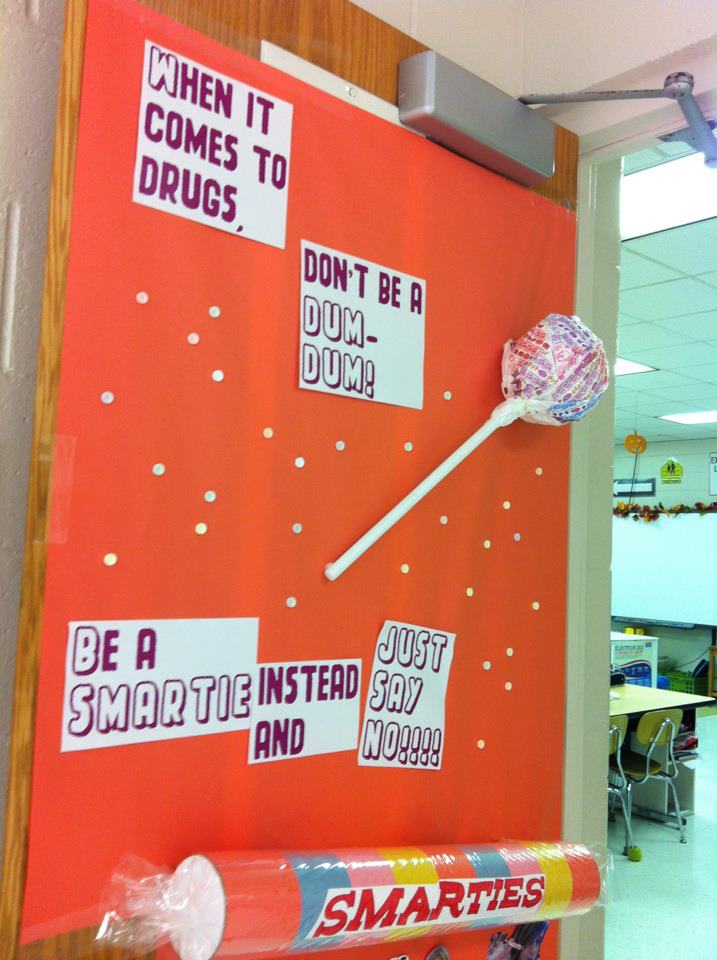
We are observing Red Ribbon Week in our school this week.  To celebrate we are having a door decorating contest.  I love seeing the creativity of my co-workers!  I thought I would share a couple doors :-)

This one is by one of my grade-level partners.  She Mod Podged all of those DumDum wrappers together to make the big one.  She is too, too artsy!

This one is by one of the second grade teachers.  Too cute!

This one is mine, we also had a bit of a book theme as a possibility, so I did the drug-free/book themed door.

How do you celebrate Red Ribbon Week at your school?

Monday, October 22, 2012

5 Days Left and Visual Bookmarking

Hi all!  Don't forget to to enter to win this HUGE giveaway at Rockin' Teacher Materials.  Only 5 days left to get your name "in the hat".  While you're checking that out, be sure to hop over to my Teachers Pay Teachers store and see all the stuff I've put up.  It's really a random mix of stuff.

Also, I stumbled across this really great way to share bookmarks a few months ago, and I am excited to tell you about it.  It's called Tizmos.  It's like Delicious and Portaportal, but the best part is: IT'S VISUAL!  It's great for all ages of students and even adults.  The thing I like about Tizmos is that when you add a link, it generates an image of the website to serve as a visual remind of what the link is.  I know that I sometimes remember what a website looks like, but I cannot remember the name.  Tizmos solves that problem for me!  I've set all of my classroom computers to go to our Tizmos as the homepage.  I've included all of the links we frequently use, and I don't have to constantly remind my students of web addresses.  Another great way to use this would be sending the link for parents, it's great for home-school resources.  I strongly encourage you to check it out!  Let me know what you think! :-)

See how nice it looks?

Sunday, October 21, 2012

Giant Giveaway & Classroom Update (long overdue)

Have you seen the GIANT giveaway hosted by Hillary at Rockin' Teacher Materials?  You can win 33 different items for all ages.  This giveaway is also a great way to find some great blogs and teacher stores!  Check it out here!  Good luck!

Also, I noticed that it's been a looooong time since my last update.  The last time I shared pictures of my classroom it was still in TOTAL disarray.  We are now 1 quarter down, so I thought I would share a panorama of my classroom as it looks today!


Tuesday, September 4, 2012

September Currently...


I can't wait to hear the First Lady speak.  I feel like she is a great speaker, and a good role model for all girls.

It's only the third full week of school, but I am pleased as punch that it's already 1 down, 3 to go.

Next week, I will be conducting my second teacher training for my job as technology integration teacher.  In the previous session we covered classroom management in rooms filled with technology.  This time, I think I'm going to cover inquiry-based learning.  I would really love any suggestions!

Who is with me on this weather thing?  SW Missouri has been a firey inferno of awful.  Granted, on the days that it rained from Hurricane Isaac we went out of town, to dry old OKC.  I'm looking forward to the weekend forecast, two days in the 70s will heal this heart.

Anyone else running out of time before running out of tasks?  If you're not, any good time management tips??

I'm eagerly awaiting the Apple news conference next week, hoping for the launch of the new iPhone, I always upgrade as soon as new stuff comes out.  SUPER BAD HABIT!  Another bad habit?  Pinterest. Bad in a good way though.  I spend my entire life too much time seeking out pictures of awesome stuff.  I feel like I've become a better teacher thanks to this great site.  Books, what teacher doesn't love books?  Currently, I'm in the midst of reading 5 different books.  Perhaps that's why I'm not getting any of them done.  That and Pinterest. :-/

Monday, September 3, 2012

Back at it?

I can't believe that I haven't posted anything in over a month.  Sorry to all my fans (ha!).  What a crazy month it has been.  I've had flipped classroom meetings, technology integrations meetings, mentor meetings, school-wide retreat, PBIS meetings, my best friend's wedding reception, our 1st annual neighborhood block party, the list goes on and on!  On top of it all, I had a classroom to prepare ad kiddos to plan for.  Rather than dwelling on all the requirements, I'm going to focus on showing off my space as part of Swimming Into Second's Linky Party.


We were able to get back into our school on August 2, my classroom was a total disaster area.  I had packed up all of my stuff, in a very precarious way--obviously.  So that the floors could be waxed.


It became progressively worse...


Until finally, the day of Open House, I shoved the last of my things away in my cabinets and put on my happy face.  Here is the "final" product.


Welcome to Room 504!

I did an Americana/Election-ish theme, kind of.

A peek in from the door.

On the right side of this picture is my Science/Social Studies featured reads shelf.  I bought it at the school auction, needless to say my custodian wasn't happy to see it, but I LOVE it.  It's double sided, once side will feature books for my current social studies unit, the other will have current science unit books.

Over view of the classroom.

Storage areas, the blue cabinets have my teacher books.  The white cabinets have supplies and textbooks that I don't use.  The wheely carts have math supplies, and games.  You can also see my clip chart, and my lunch check in.


Left side of the room.  The white cart is my iPod lab.  The orange board is my Math Focus Wall.  
Then on my white board, I have my Learning Targets.  You can pick those up at my TPT store.

Right side of the room.  My writing process pocket chart (the pencil) will have reference materials in it that students can use throughout the writing process.  The white bulletin board is focused on writing.

Library and reading area.  The big bulletin board (actually a piece of insulating foam from Lowe's for $12!!) is my reading focus board.  Brought the couch out from storage.  Love that thing.


Teacher area with small group table.  I finally got them to take out my useless desk.

I have 21 precious 5th graders who have filled my classroom with laughter and learning for the past three weeks.  More to come on that soon.  Hope you've enjoyed the tour!

~Heather